用 AtScale 和 Amazon Bedrock AgentCore 在 AWS 上为智能体 AI 构建语义层
Build a semantic layer for agentic AI on AWS with AtScale and Amazon Bedrock AgentCore
AWS 与 AtScale 演示如何在 Amazon Bedrock AgentCore 上为 Strands 智能体构建基于 AtScale 的语义层,采用客户 360 场景。
In the first post in this series, we built a semantic layer on AWS using Stardog’s knowledge graph over Amazon Aurora and Amazon Redshift. We ran a Strands agent on Amazon Bedrock AgentCore against that layer. The second post kept the same customer 360 (C360) pattern and swapped in Denodo’s data virtualization platform, extending the source mix to include an on-premises PostgreSQL cluster. This post uses the same C360 pattern again, with AtScale as the semantic layer.
AtScale takes a different shape from the first two. The semantic model is dimensional (dimensions, hierarchies, and measures) rather than a graph of triples or a set of views. AtScale authors the model in the Semantic Modeling Language, an open, YAML-based specification versioned in Git, and exposes it simultaneously, from a single deployed model, over three protocols: SQL, XML for Analysis (XMLA), and the Model Context Protocol (MCP). The Strands agent and the business intelligence (BI) tools the enterprise already uses get the same computed answer from the same definitions.
The rest of the pattern carries over from the earlier posts. A foundation model on Amazon Bedrock (Anthropic Claude Sonnet 4.6 for the walkthrough) plans and writes queries. Amazon Bedrock AgentCore hosts the Strands agent and manages the outbound credential the agent presents to AtScale. The joins, metric definitions, and row and column filters that apply to the caller live inside the semantic layer rather than the prompt.
We assume you’re familiar with the semantic-layer architecture from the first post in the series: what a semantic layer is, what it’s for, and why the model plans queries without owning the joins. If any of that is new, the first post covers the ground.
By the end of this post, you will know:
- How to model a C360 domain in the Semantic Modeling Language (SML): datasets, dimensions and hierarchies, facts, measures, calculated measures, and perspectives, versioned in Git.
- How AtScale plans a dimensional query against Amazon Redshift, and how AtScale’s autonomous aggregate management accelerates the query patterns an agent generates.
- How to expose the model to an AgentCore-hosted Strands agent through the AtScale MCP server, and how to register that MCP server with AgentCore Gateway, a capability of Amazon Bedrock AgentCore.
- How the human user’s identity propagates from the enterprise identity provider through AgentCore Identity, a capability of Amazon Bedrock AgentCore, to AtScale, and how AtScale enforces role-based access control (RBAC), row security, and perspectives at query time.
- How to deploy AtScale on Amazon Elastic Kubernetes Service (Amazon EKS) using the AtScale Helm chart and the AtScale K8S Blueprints repository.
The source of truth for the walkthrough is the AtScale C2026.7 release. Where a specific tool name or endpoint applies, we cite the AtScale documentation.
The example: Customer 360 on Amazon Redshift
The customer 360 pattern from the first two posts stays in place. A retail enterprise has customer records, orders, products, and rewards enrollments spread across systems, and business users want to ask cross-cutting questions without knowing which system holds which fact. The Stardog C360 Knowledge Kit we adapted for the first post in the series models this scenario with Customer, Order, Product, and Address entities joined on an integer cid that appears as a primary key in the customer table and as a plain column in the purchase table.
Where this post differs from the first two is where the data physically sits. Stardog and Denodo federate at query time across two engines. AtScale plans a dimensional query as native warehouse SQL and pushes it to one engine per query, so cross-engine data is consolidated upstream. For this walkthrough, all analytical C360 data lives in Amazon Redshift Serverless. Amazon Aurora PostgreSQL remains the operational system of record, and a replication path (AWS Database Migration Service or Amazon Aurora zero-ETL to Amazon Redshift) keeps the analytical copy current. The agent queries a single AtScale model that maps to the Amazon Redshift tables.
The schema in Amazon Redshift:
| Table | Key columns |
| customer | cid (PK), first_name, last_name, email, ssn, phone, location |
| address | id (PK), city, state, zip, street_name |
| credit_card | id (PK), cid, card_num, card_type |
| rewards_account | id (PK), cid, account_id, create_date |
| purchase | id (PK), pid, purchase_date, quantity, price, cid, card |
| product | id (PK), name, brand, price, dept |
| category | id (PK), dept_name, parent |
| vendor | id (PK), vendor_name, industry |
Nine columns of interest across eight tables. cid links customer records to purchases. pid links purchases to products. dept links products to categories. Everything analytical is in Amazon Redshift, so joins push down to native SQL rather than being resolved in the semantic layer or in an extract, transform, and load (ETL) pipeline.
A representative question that exercises the whole model: Which of our top 20 customers by lifetime spend haven’t enrolled in the rewards program yet? This is the auto-enrollment question from the Denodo post, carried over so a reader following the series can see the same request answered by a different semantic layer. It touches customer profile, address, purchase history, and enrollment status: one row per customer across four logical entities.
AtScale terms used in this post
AtScale implements the semantic layer as a dimensional model over a warehouse. The AtScale documentation and the SML specification use a specific set of primitives that come up throughout this post. A short reference is useful before we get to the walkthrough.
- Semantic Modeling Language (SML) – An open, YAML-based specification for describing semantic models. Every SML object (model, dataset, dimension, hierarchy, metric, calculation, perspective, row security) is a YAML file. The specification lives at github.com/semanticdatalayer/SML.
- Model – The top-level artifact. A model references datasets, dimensions, facts, and metrics, and exposes them through the AtScale query engine.
- Dimension and hierarchy – A dimension groups related attributes (customer, product, date). A hierarchy inside a dimension organizes those attributes into levels (product → category → department, or year → quarter → month → day).
- Fact and measure – A fact is a dataset that holds measurable events joined to dimensions on key columns. A measure is a quantity aggregated from a fact column, for example
SUM(price * quantity)for revenue. - Calculation – A derived measure expressed as a formula against other measures.
- Perspective – A publishable subset of the model exposed to a specific role or group. Perspectives are how AtScale controls which dimensions and measures a caller can see.
- Row security – A model object that filters rows returned to the caller based on the caller’s identity or attributes.
- Autonomous aggregate management – AtScale watches query patterns across consumers and materializes summary tables in the warehouse when a pattern is expensive enough to justify one. Subsequent queries that match the pattern route to the aggregate transparently.
- Design Center – The AtScale authoring surface. A modeler edits SML through a visual canvas or a text editor. Either way the artifact on disk is SML YAML in Git.
- AtScale MCP server – The in-product MCP endpoint at
<atscale-host>/mcpthat exposes the semantic model to any MCP client.
Where more detail is useful, the AtScale documentation and the SML specification are the authoritative references.
Reference architecture
The runtime splits into an inbound path and an outbound path, following the same shape as the Stardog and Denodo posts.
Inbound. A client sends the user’s question to the Strands agent through AgentCore Gateway. Gateway validates the JSON Web Token (JWT) that identifies the human user against the enterprise identity provider (IdP), then routes the request to AgentCore runtime (a capability of Amazon Bedrock AgentCore), which hosts the agent process. The agent invokes Claude Sonnet 4.6 on Amazon Bedrock to interpret the prompt and plan the query.
Outbound. When the agent decides to query the semantic model, it invokes a tool call to the AtScale MCP server. AgentCore Gateway serves as the outbound proxy: the AtScale MCP server is registered as an MCP target on Gateway, so tool calls route through Gateway and AgentCore Identity injects the credential at that hop. AtScale’s MCP endpoint accepts either a bearer token (for development and single-identity scenarios) or an OAuth 2.0 access token issued by AtScale’s bundled Keycloak instance (the production path). The AtScale engine validates the token, resolves the caller to an AtScale role, and plans the query against the deployed C360 model.
The query request travels down through the AtScale engine, and the results travel back up. There’s no ETL job that pre-materializes cross-database joins. The analytical copy in Amazon Redshift is the source of truth for the semantic model, kept fresh from Aurora by the upstream replication path.
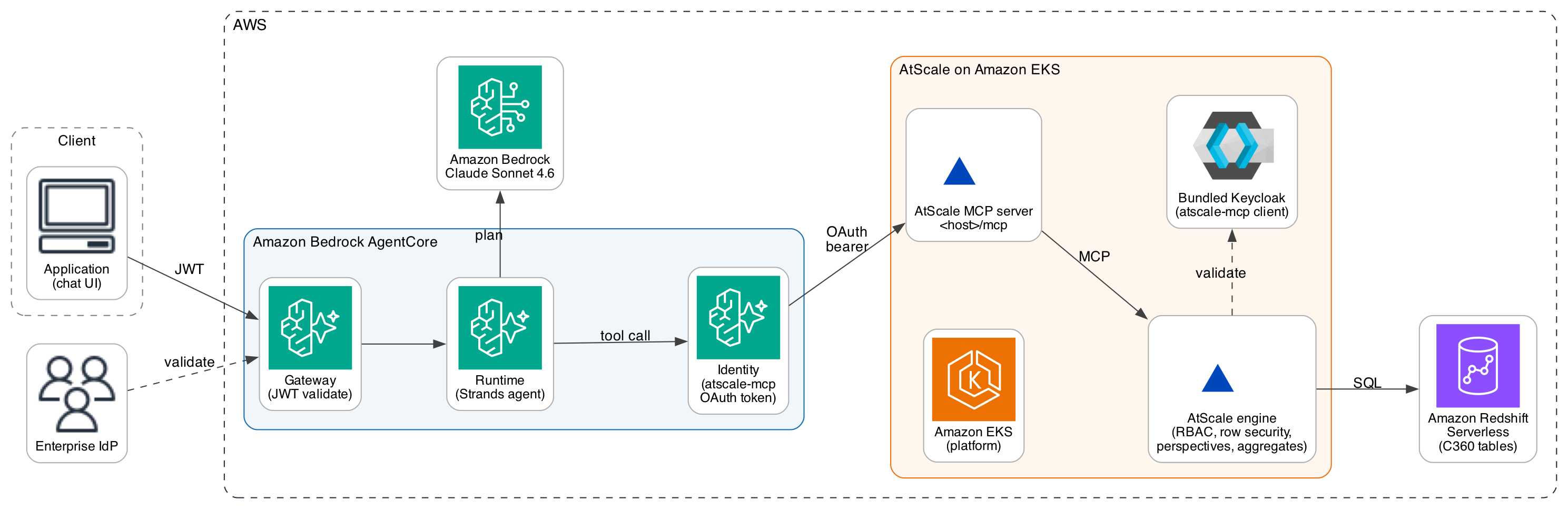
Figure 1: Inbound authentication path and outbound query path between the client, Amazon Bedrock AgentCore components, the AtScale MCP server, the AtScale engine, and Amazon Redshift Serverless
The architecture is deliberately opinionated on identity. Gateway and Identity hold the tokens at the runtime edges. The agent doesn’t see them and only orchestrates the conversation and the tool calls.
Build the semantic layer
AtScale’s semantic model is a collection of SML objects (datasets, dimensions, facts, measures, calculations, perspectives, row security) versioned in Git. A working model has a shape a data engineer will recognize from a star schema, but every object is expressed as YAML rather than data definition language (DDL), and every object is a separate file. Building the C360 model happens in three passes: datasets over the Amazon Redshift tables, dimensions and hierarchies with the joins between them, and measures and calculations that express the business logic.
Datasets. Each Amazon Redshift table becomes an SML dataset. A dataset declares the physical connection, the schema, the table, and the columns AtScale will surface. Datasets can be authored visually in Design Center or edited directly as YAML. Either surface writes the same SML file to Git.
Dimensions and hierarchies. The C360 model has seven dimensions. dim_customer holds customer profile attributes and joins to dim_address through the location key and to dim_rewards through cid. dim_product holds product attributes and organizes them into a hierarchy through dim_category. dim_date supports date-based analysis. dim_vendor groups products by supplier. dim_rewards holds one row per enrolled customer with account_id and create_date, and snowflakes off dim_customer so that never-enrolled customers surface as null in the enrollment attributes.
AtScale’s hierarchy primitive is the concise expression of the product-to-category relationship. A query against the model can navigate product → category → parent category without a recursive SQL common table expression, and the large language model (LLM) sees a single dimensional path rather than a join graph.
A representative SML fragment for the product hierarchy:
# dim_product.yml
unique_name: dim_product
object_type: dimension
label: Product
hierarchies:
  - unique_name: product_category
    label: Product Category
    levels:
      - unique_name: department
        dataset: category
        key_columns: [dept_name]
      - unique_name: category
        dataset: category
        key_columns: [id]
      - unique_name: product
        dataset: product
        key_columns: [id]
secondary_attributes:
  - unique_name: brand
  - unique_name: product_name
    key_column: name
Facts and measures. The fact table for C360 is fact_purchase, mapped to the Amazon Redshift purchase table. It joins to dim_customer on cid, to dim_product on pid, and to dim_date on purchase_date. Measures come off the fact: total_revenue as SUM(price * quantity), order_count as COUNT(id), and units_sold as SUM(quantity).
Calculated measures. Business logic that lives in the model rather than in the query. customer_lifetime_value is total_revenue evaluated at customer grain, the same formula applied to a coarser slice of the fact. Segments like big_spender and spend_tier are calculated measures with conditional expressions:
# big_spender.yml
unique_name: big_spender
object_type: metric
expression: |
  CASE WHEN SUM(price * quantity) > 10000
  THEN 'Yes' ELSE 'No' END
The expression is evaluated at query time. A column would hold one answer at one grain. The expression recomputes for whatever slice the query asks about, by customer, by customer and year, or by region. When the definition changes (the threshold moves from $10,000 to $15,000), the update happens in one YAML file, gets reviewed as a pull request, and deploys through the AtScale CI hook. Each consumer picks up the new definition on the next query, whether that is the agent, Excel over XMLA, or Tableau over Multidimensional Expressions (MDX).
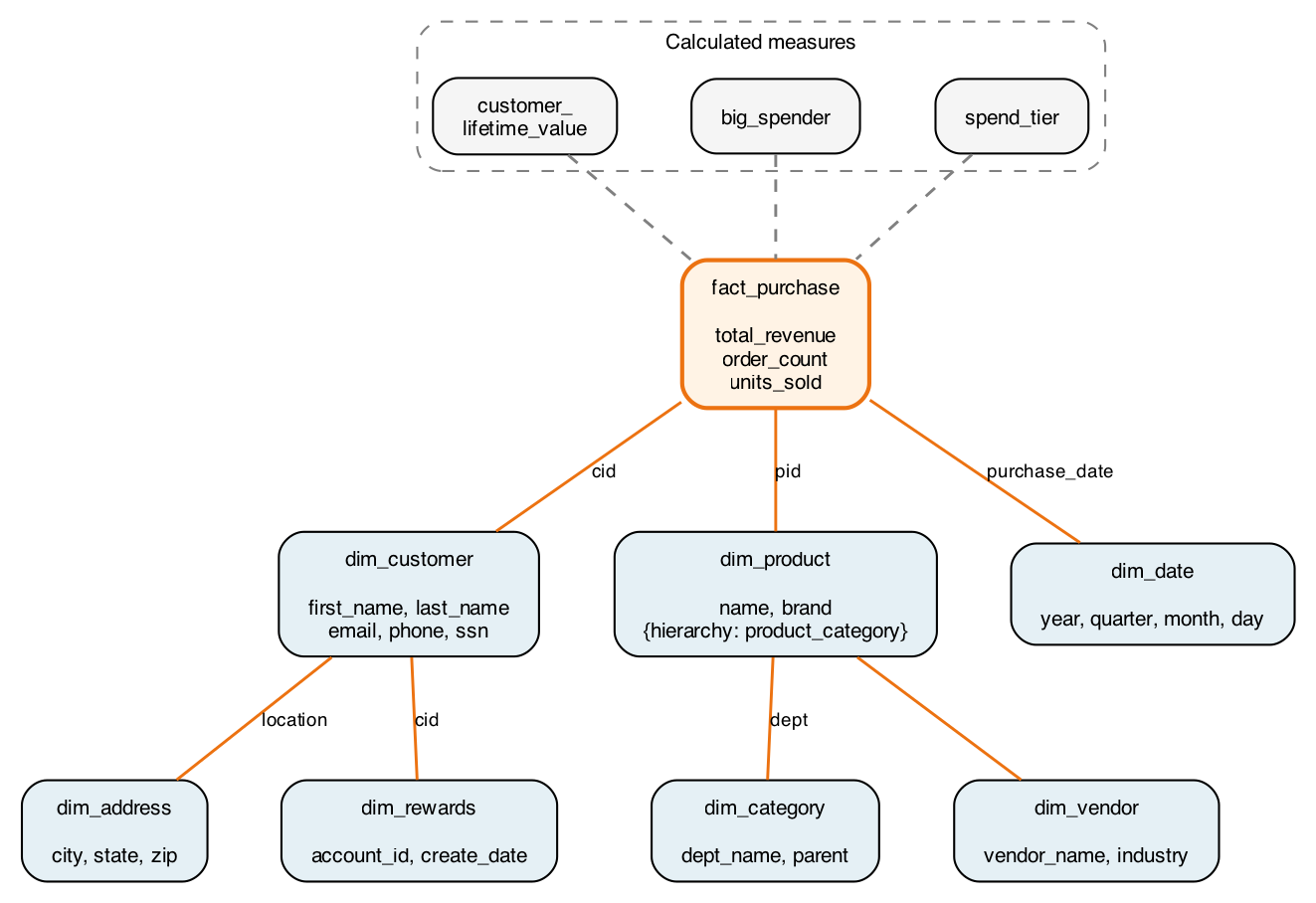
Figure 2: The C360 model in AtScale Design Center. dim_customer, dim_address, dim_rewards, dim_product with the product-to-category hierarchy, dim_date, dim_vendor, and fact_purchase connected by orange lines that indicate dimension-to-fact and snowflake relationships. Calculated measures (customer_lifetime_value, big_spender, spend_tier) appear as separate nodes referenced from the fact
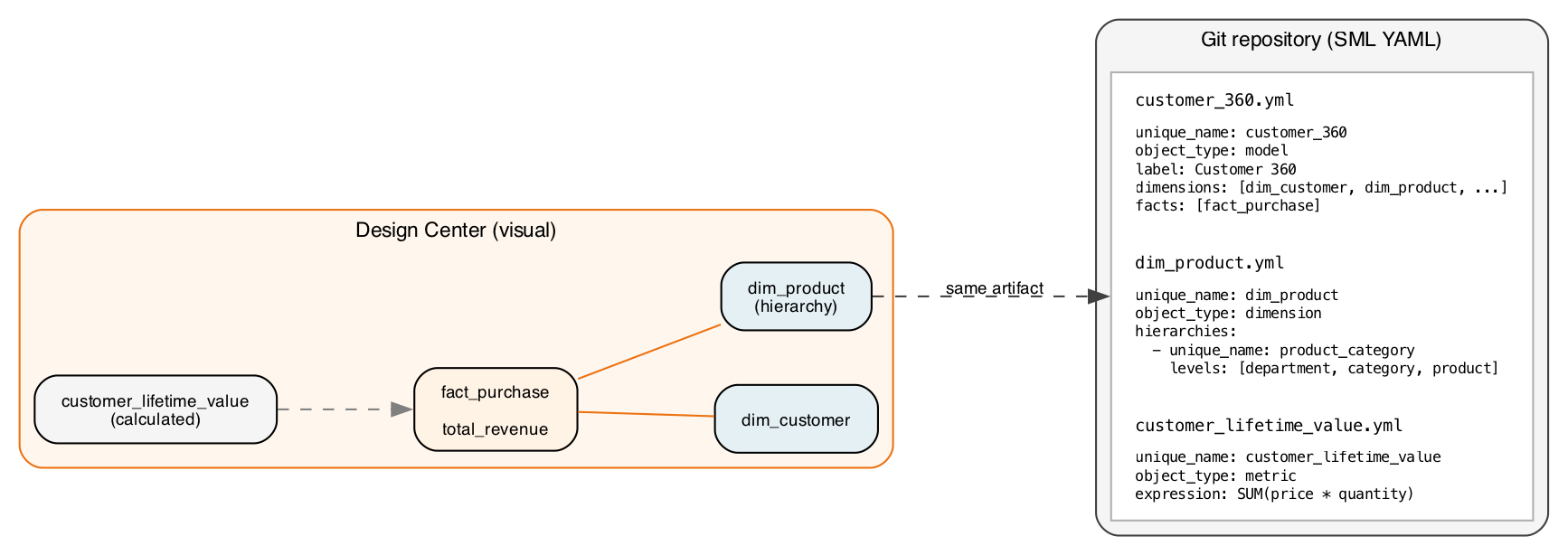
Figure 3: The same model as side-by-side SML YAML, one file per dimension, metric, and calculation, versioned in a Git repository
The artifact on the right of Figure 3 is not a description of the model. It is the model. Design Center’s visual canvas and the YAML editor are two views of the same file, and the Git diff is the authoritative record of every change. The files conform to the open-source SML specification, so the repository can be read without the engine.
After it’s deployed, the model is simultaneously reachable over SQL (for JDBC-based BI tools and notebooks), XMLA (for Excel and Power BI), and MCP (for the agent). The total_revenue calculation returns the same number to Claude Sonnet 4.6 as it does to an Excel PivotTable pointed at the same XMLA endpoint. We confirm this match in Verification.
How AtScale plans and pushes down queries
When the agent asks a question against the semantic model, AtScale’s AI Computation Engine (ACE) does the planning. The steps a query goes through are the same for a dimensional SQL request from the MCP run_query tool and for an XMLA request from Excel. Only the parser at the front differs.
Take the auto-enrollment question: Which of our top 20 customers by lifetime spend haven’t enrolled in the rewards program yet? The agent, prompted with the model context returned by describe_model, composes a dimensional SQL query against the C360 model. ACE parses that query into a logical plan, resolves the dimensional references to the underlying fact_purchase, dim_customer, dim_address, and dim_rewards datasets, applies any row security the caller is subject to, and then plans the physical query against Amazon Redshift.
Two things happen at the physical-planning stage that separate AtScale from a hand-written pipeline. First, the join is pushed to Amazon Redshift as a native SQL join rather than materialized in the semantic layer. The Amazon Redshift optimizer sees a single SQL statement with a filter and an aggregate, and executes it accordingly. Second, AtScale’s aggregate manager checks its registry for a pre-built aggregate that matches the query pattern. If a summary table exists that groups purchases by customer at the right grain, AtScale rewrites the query to hit the aggregate instead of scanning fact_purchase. The query returns in a fraction of the time it would take against the raw fact table, without the agent or the modeler doing any manual work to route it.
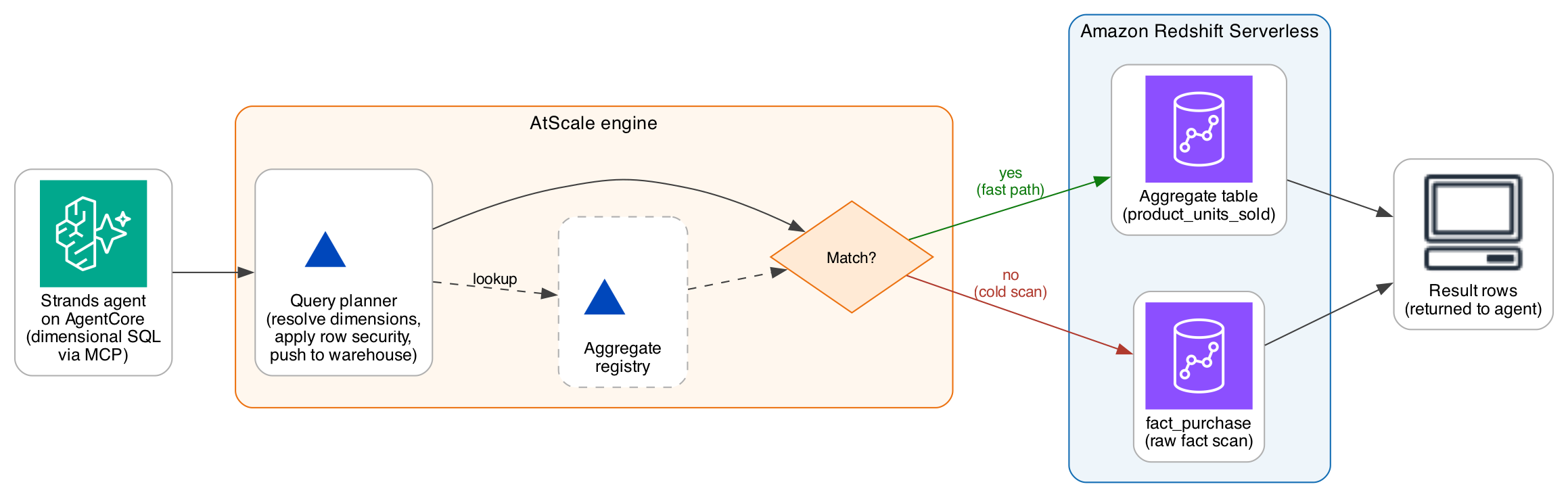
Figure 4: The agent’s dimensional query enters the AtScale planner. The planner checks its aggregate registry, finds a matching aggregate for the query pattern, rewrites the query to hit the summary table in Amazon Redshift, and returns the result. The lower path shows the same query without a matching aggregate hitting fact_purchase directly
The aggregate manager is what makes an agent-driven workload economically feasible. LLM-driven analysis fires more queries than a human analyst would, and open-ended prompts like Tell me something interesting about our sales can spawn a dozen. AtScale watches the query pattern, materializes aggregates in the warehouse itself (not a separate cache), and routes matching queries transparently. Aggregate creation is demand-defined against observed traffic across consumers, not only the agent.
The audit record for the query captures both the dimensional SQL the LLM wrote and the warehouse-native SQL AtScale rewrote it into, along with whether an aggregate served the query. That record is available to an operator through the AtScale Queries page in Design Center, and it’s what the following governance section builds on.
A note on multi-source and interoperability
AtScale connects to warehouses over JDBC. The C360 walkthrough targets Amazon Redshift Serverless. The same SML model works over Snowflake, Databricks, and Google BigQuery, and AtScale documents the connection pattern for each. What changes when you swap the connection is the SQL dialect AtScale emits, not the SML in Git.
One architectural property is worth stating explicitly because it differs from the first two posts in this series. A single AtScale query resolves in one warehouse engine. If the C360 model spans two warehouses (dimensions on Snowflake, facts on Amazon Redshift, say), a query that touches both must be reconciled in one of two ways. The first is upstream, by consolidating an analytical copy in one warehouse through a replication path. The second is by the warehouse itself, using engine-level federation such as Amazon Redshift Spectrum for querying Amazon Simple Storage Service (Amazon S3), or Apache Iceberg tables that both engines can read. AtScale plans a dimensional query and pushes it to one engine. The cross-engine story lives one layer down.
That choice cuts both ways. It rules out the live cross-engine federation Stardog and Denodo perform at query time, but it lets AtScale’s planner and aggregate manager work against a single-engine execution model, which is what makes the aggregate story load-bearing at scale. Enterprises that already run a warehouse-centric analytical architecture with change data capture (CDC) pipelines from operational systems reuse that architecture. Enterprises whose answers require live federation across engines are better served by the semantic layers in the first two posts.
Governed access: Identity propagation and runtime enforcement
Customer 360 data is regulated. Some users (HR, fraud) need to see personally identifiable information such as Social Security numbers and card numbers. Most users (marketing, analytics) must not. Row-level filters restrict analysts by geography, and a per-user audit trail must survive from the human’s browser through to the warehouse.
AtScale enforces these requirements at the semantic layer, before any query reaches the warehouse. Enforcement happens identically whether the caller is the Strands agent over MCP, an analyst in Excel over XMLA, or a notebook over JDBC. One row-security object in SML, one perspective, one set of role bindings, applied to each consumer of the model.
Identity propagation from the user to AtScale
The chain follows the same shape as the one in the Denodo post, with the terminal hop landing at the AtScale engine rather than continuing to the warehouse.
- The human authenticates to the application against the enterprise IdP and receives a JWT.
- The application forwards the JWT as a bearer token to the Strands agent through AgentCore Gateway, which validates it (issuer, audience, signature) and routes the request to AgentCore runtime.
- When the agent invokes a tool call to the AtScale MCP server, AgentCore Identity supplies the OAuth 2.0 access token issued by AtScale’s bundled Keycloak, mapped to the human user’s identity. The AtScale credential does not enter agent code.
- The AtScale MCP server accepts the OAuth token. The AtScale engine validates it against Keycloak, resolves the caller to an AtScale role, and plans the query with the caller’s row-security constraints and perspective bindings applied. The warehouse is reached with the AtScale connection identity from AWS Secrets Manager.

Figure 5: The identity chain from human user through AgentCore Gateway, AgentCore runtime, AgentCore Identity, the AtScale MCP server, and the AtScale engine, terminating at the semantic-layer enforcement point. The warehouse hop is a service-account connection with the AtScale credential
RBAC, row security, and perspectives
AtScale expresses access control as three composable primitives. RBAC assigns roles to callers based on Keycloak claims. Row security is a model object that filters rows returned to the caller based on the caller’s identity or attributes. A perspective is a publishable subset of the model exposed to a specific role or group.
For the C360 walkthrough, we define two roles.
hr_user: sees the full C360 model, includingssnandcard_num.marketing_user: sees the Marketing perspective, which hidesssnandcard_numat the model layer.
When marketing_user asks a question that references ssn, the agent’s describe_model call returns the Marketing perspective, one that does not include ssn. The agent has no attribute to project. Row-level filters compose the same way: an SML row-security object that scopes customers by state restricts a caller to a specific set of rows without any change to the agent’s prompt.
Audit fidelity
Queries through the AtScale engine are logged with the caller’s identity, the model, the LLM-generated dimensional SQL, the AtScale-translated pushdown SQL that Amazon Redshift saw, the security policies applied, whether an aggregate served the query, and the row count returned. Because the record captures both the query the model wrote and the query the warehouse executed, an auditor can trace an answer from the human question to the SQL that produced the number. Neither the first nor the second post in this series captures both forms of the query in one record.
An audit record for a governed query looks like this:
{
  "timestamp": "2026-08-31T10:34:56Z",
  "user_identity": "[email protected]",
  "user_role": "marketing_user",
  "semantic_model": "Customer_360",
  "question": "Top 10 customers by revenue in California",
  "generated_sql": "SELECT full_name, total_revenue FROM ...",
  "translated_pushdown_sql": "SELECT ... FROM redshift ...",
  "security_policies_applied": ["regional_row_security"],
  "served_from": "aggregate",
  "execution_time_ms": 850,
  "rows_returned": 10
}
The generated_sql and translated_pushdown_sql fields are the ones that make the trail complete: an auditor sees both the query the LLM composed against the semantic model and the query the warehouse actually ran.
Expose the layer through the AtScale MCP server
The AtScale MCP server is a component of the AtScale distribution, exposed at <atscale-host>/mcp. It’s generally available in the AtScale C2026.7 release and speaks the standard Model Context Protocol. Any MCP-compatible client (the Strands agent in AgentCore runtime, Claude, ChatGPT, Cursor, VS Code) can connect to the same endpoint against the same deployed model.
The server exposes a set of tools scoped to querying the semantic model. The AtScale documentation publishes a tools reference per release. The tools that matter for an agent-driven workload are:
list_models: Enumerate the models the caller can see, along with the column groups that describe how dimensions map to facts.describe_model: Return the dimensions, hierarchies, measures, calculations, and business descriptions for a chosen model. This is the payload the agent’s system prompt is loaded with before it starts composing queries.search_columns: Keyword search over the model’s columns. Useful when a fulldescribe_modelpayload would use too much of the LLM’s context window.validate_query: Check that a dimensional SQL statement is compatible with the model without executing it against the warehouse. This lets the agent iterate on its query cheaply before firing anything Amazon Redshift will bill for.run_query: Execute a dimensional SQL statement against the model and return the rows.run_queries: Run multiple statements in a batch, useful for open-ended prompts where the agent fires several exploratory queries in parallel.get_version: Report the MCP server version, so a client can decide whether to cache the model schema.
The AtScale MCP endpoint accepts two authentication modes. The bearer-token path uses an API token minted from Design Center. Every request runs as the token owner, and this path suits a proof-of-concept or a single-identity service. The OAuth 2.0 path uses AtScale’s bundled Keycloak with a pre-provisioned client whose ID is exactly atscale-mcp, documented on the AtScale Connecting with Claude page. AgentCore Gateway presents the access token on the agent’s behalf, the AtScale engine validates it against Keycloak, and downstream policy evaluation uses the human user’s identity.
Registering the AtScale MCP server as an AgentCore Gateway target follows the standard Gateway MCP target flow. The tools listed earlier appear to the agent as ordinary tools, with AgentCore Identity handling the credential at the Gateway hop.
The AtScale MCP server exposes tools scoped to querying, and AtScale has been extending the MCP surface with author-side tools that let an agent introspect a warehouse schema, generate a candidate SML model from source metadata, validate the SML against the specification, and commit the result to Git. This pattern, in which an agent shapes the semantic model rather than only reading from it, is a natural fit for Claude Code and Cursor workflows. In those workflows, a data engineer collaborates with the LLM to bootstrap a model over a new dataset.
AtScale groups this direction into three capabilities. A Semantic Discovery Engine scans warehouse schemas, query history, and lineage to infer candidate joins, hierarchies, and metric definitions. A Model Recommendation System suggests dimensions, measures, and relationships based on observed query patterns. A Governed Feedback Loop keeps human review of AI suggestions in the SML-and-Git workflow, so changes are versioned and auditable.
The specific tools available at the time of publication are documented in the AtScale MCP tools reference. Check the current release notes for what is generally available and what is still in preview. The rest of this post covers the consumer path, an agent querying a deployed model, which is what a production C360 workflow relies on today.
Deploy and run the agent
Strands Agents is a small framework for building agents. A short Python entry point wires Claude Sonnet 4.6 on Amazon Bedrock to the AtScale MCP server as a tool source. AgentCore runtime hosts the process. AgentCore Gateway terminates inbound requests and holds the outbound AtScale credential through AgentCore Identity. Foundation model availability on Amazon Bedrock varies by AWS Region. For the current list, see Regional availability by models.
The system prompt matters. The AtScale documentation and the reference demos in the AtScale corpus consistently recommend a three-step call pattern for the agent: list_models to see what is available, then describe_model on the target model to load the dimensions and measures into context, and only then run_query (or validate_query first, if the query is expensive to iterate on). The reasoning is that the LLM should not fabricate column names or metric names. It should reference only what describe_model returned. The system prompt should say so explicitly, and it should include a short section on the business terminology in the target model (total_revenue means sales dollars, not units) so the agent maps user questions to the right measure.
Turn on Amazon Bedrock prompt caching for the reused portion of the system prompt. The describe_model payload runs to a few thousand tokens and does not change within a model version, so caching it drops the input-token cost per query on repeated calls. The cache-point configuration is a request parameter on the BedrockModel object. See the Strands documentation for the current parameter name.
Verification
To confirm the semantic layer, the agent, and the identity flow work as intended, we ran three queries through the agent and then a governance rerun of one of them under a different role. The following behavior is what should reproduce in a working deployment.
Query 1, single dimension
List our customers in Wisconsin, with their city.
The agent generates a dimensional SQL query against the C360 model that selects first_name, last_name, and city from dim_customer and dim_address where state = 'WI'. AtScale’s planner resolves the dimensional path to the customer and address tables in Amazon Redshift, pushes a single SQL statement down, and returns the rows.
Query 2, aggregation with aggregate hit
What are our top 10 products by units sold?
The agent aggregates units_sold by product and orders descending. AtScale’s aggregate manager finds a matching demand-defined aggregate and rewrites the query to hit the summary table in Amazon Redshift rather than scanning fact_purchase. The Queries page shows both the LLM-generated dimensional SQL and the aggregate-routed warehouse SQL side by side.
Query 3, cross-domain
Which of our top 20 customers by lifetime spend haven’t enrolled in the rewards program yet?
The agent generates a query that joins dim_customer, dim_address, dim_rewards, and fact_purchase, and aggregates customer_lifetime_value by customer. The query restricts to customers where dim_rewards.account_id is null. The left join to dim_customer on cid keeps never-enrolled customers, who surface with a null enrollment record. The agent returns the top 20 by lifetime spend. AtScale’s planner resolves the joins to native SQL against Amazon Redshift and returns the ranked list. The customer_lifetime_value formula is not something the LLM had to invent. It’s a calculated measure defined once in customer_lifetime_value.yml and referenced by name in the query.
Governance rerun
We run a variant of Query 1 that adds ssn to the projection (Show me our customers in Wisconsin, with their SSN) as two different callers. As hr_user, describe_model returns the full C360 model, the agent composes the query, and the result set includes the SSN values. As marketing_user, describe_model returns the Marketing perspective, which does not expose ssn. The agent has no attribute to project, so it returns an answer without SSN. Nothing changes between the two runs except the caller’s identity. The query text, the agent code, the MCP server, the AtScale engine, and Amazon Redshift are all untouched.
Cross-consumer confirmation
We opened the same C360 model in Excel through the AtScale XMLA endpoint and dragged Customer.State and Total Revenue onto a PivotTable. The state-level totals match the ones the agent returned for equivalent questions, to the exact number.
Extending across data sources
Adding a new data source to the C360 model is a modeling exercise, not an integration one. Suppose the customer support team asks that the model include ticket volumes so an agent can answer Which of our top spenders opened a support ticket in the last 30 days? The steps are:
- Land the support-ticket data in Amazon Redshift alongside the other C360 tables, using the same replication pattern used for the operational tables.
- Add an SML dataset that maps the new table to a logical object.
- Add or extend a dimension (
dim_ticket) and add the join todim_customeroncid. - Add any new measures the model needs (
open_ticket_count,avg_resolution_time). - Commit the SML changes, review them as a pull request, and deploy through the AtScale CI hook.
Nothing changes in the agent code or the AgentCore configuration. The next time the agent calls describe_model, it sees the new dimension and measures, and it can compose questions against them. The same pattern applies to a different warehouse. If a source lands in Snowflake or Databricks rather than Amazon Redshift, the connection is a new SML dataset with a Snowflake or Databricks connection, and queries resolve in that engine per the earlier multi-source note.
Deployment: AtScale on Amazon EKS
AtScale runs on Kubernetes, and the reference deployment on AWS is Amazon EKS. AtScale ships an official Helm chart at oci://docker.io/atscaleinc/atscale, and the AtScale K8S Blueprints repository provides infrastructure as code (IaC) scaffolding for standing up an EKS cluster with the components AtScale expects: an ingress controller, a persistent store for the AtScale metadata database, a Redis instance for query caching, and an AtScale-configured Keycloak instance for identity federation.
The AtScale deployment on EKS runs across a small set of Kubernetes pods. atscale-engine is the core query planner and executor. atscale-mcp-server is the MCP endpoint the agent talks to. atscale-keycloak is the bundled identity provider that federates to Amazon Cognito, Okta, Azure Active Directory, and other OpenID Connect (OIDC)-compliant IdPs. Supporting pods handle the SML API and the Design Center UI (atscale-sml-api, atscale-sml-web), PostgreSQL metadata storage (atscale-db), the query cache (atscale-redis), and ingress (atscale-ingress, typically fronted by an AWS Network Load Balancer).
The C360 application (a chat UI or a client library that calls the agent) can run in the same EKS cluster in its own namespace. It uses an IAM role for service account (IRSA) to reach Bedrock and AWS Secrets Manager without embedding credentials.
Networking is standard: AtScale reaches Amazon Redshift through the virtual private cloud (VPC) endpoint or a security-group rule that permits the AtScale namespace’s egress to Amazon Redshift, and the human user reaches the application through the ingress load balancer.
AtScale offers cloud deployment options beyond self-managed EKS. Check the AtScale website for current offerings and AWS availability. The rest of this post assumes the self-managed pattern described earlier.
Conclusion
Agentic access to enterprise data needs three things working together: a foundation model that can plan and generate queries, a semantic layer that computes governed, business-meaningful answers over the live warehouse, and a runtime that hosts the agent and manages the identity flow. Amazon Bedrock, AtScale, and Amazon Bedrock AgentCore each play one of those roles.
The agent talks to the semantic layer, not directly to the warehouse. Dimensions, hierarchies, measures, perspectives, and row security live in SML in Git. When a schema drifts or a governance rule changes, the update happens in one file, and each consumer (the agent, Excel, Tableau, Power BI) picks it up on the next query.
Where to start
Most teams that get this working start narrow and expand.
- Pick one workflow that spans two or three data sources and takes longer than it should to answer today.
- Write 3–5 questions the workflow needs to answer. These are the queries the semantic layer has to support on day one.
- Consolidate the analytical data into Amazon Redshift (or the warehouse of your choice), using AWS Database Migration Service or Amazon Aurora zero-ETL for operational data.
- Bootstrap the SML from the warehouse schema in Design Center, then refine it against the competency questions.
- Deploy AtScale on Amazon EKS with the AtScale Helm chart and the AtScale K8S Blueprints, register the AtScale MCP server as an AgentCore Gateway target, and wire a Strands agent through it.
Further reading
- AtScale MCP server documentation: Connect to AtScale with AI
- AtScale C2026.7 release notes: documentation.atscale.com
- AtScale MCP tools reference (published per release with the AtScale documentation)
- AtScale K8S Blueprints: github.com/AtScaleInc/atscale-k8s-blueprints
- Semantic Modeling Language specification: github.com/semanticdatalayer/SML
- Amazon Bedrock AgentCore Developer Guide
- Amazon Bedrock prompt caching
- Strands Agents on AWS Prescriptive Guidance
- Build a semantic layer for agentic AI on AWS with Stardog and Amazon Bedrock AgentCore (first post in this series)
- Build a semantic layer for agentic AI on AWS with Denodo and Amazon Bedrock AgentCore (second post in this series)
About the authors
来源: AWS Machine Learning Blog · aws.amazon.com